Passenger transportation
Inspection records
your mechanic
can find.
36MDC is a mobile workflow for the field-compliance loop that lives outside dispatch software: driver inspections, defect closure, annual records, and accessible-equipment checks.
Accepting first launch partners · 2026
The day-to-day problem
One inspection. Three places it can go missing.
Small or mid-sized passenger carriers usually run on three disconnected realities. Drivers handle pre- and post-trip checks on paper or by text. Mechanics track repair needs in a separate workflow. Owners and dispatchers find out about the gap only when there's a roadside inspection, a breakdown, an insurance question, or an accessibility complaint.
That is not just inefficient. It is documentary risk. Defects do not close cleanly. Annual inspection records are inconsistent across a fleet. Accessible-equipment checks are hard to prove.
What we'd build for your fleet.
Six forms, anchored to FMCSA and ADA requirements. One inspection-and-correction loop across charter, shuttle, limo, and NEMT vehicles.
- 01
Driver vehicle inspection report
Direct regulatory anchor under 49 CFR 396.11 and a daily-use form that drives adoption.
Vehicle, trailer if applicable, date and time, defects by required category, no-defect fast-complete path, optional photo or short video evidence.
- 02
Defect correction and return-to-service
Closes the loop the DVIR opens. Without this, the inspection is paperwork; with it, the vehicle is safe to operate.
Linked DVIR, defect items, repair performed or not necessary, certifying mechanic, certification timestamp, before-and-after photos.
- 03
Periodic or annual inspection record
High audit value. Required content under 49 CFR 396.21 with 14-month retention.
Inspector identity, motor carrier, date, vehicle, components inspected, results, certification of accuracy, optional next-due-date tracking.
- 04
Bus emergency-exit and pushout-window inspection
Recurring 90-day FMCSA requirement that is easy to miss when handled on paper.
Vehicle, inspection date, emergency door status, pushout window status, marking light status, defect path, corrective action owner.
- 05
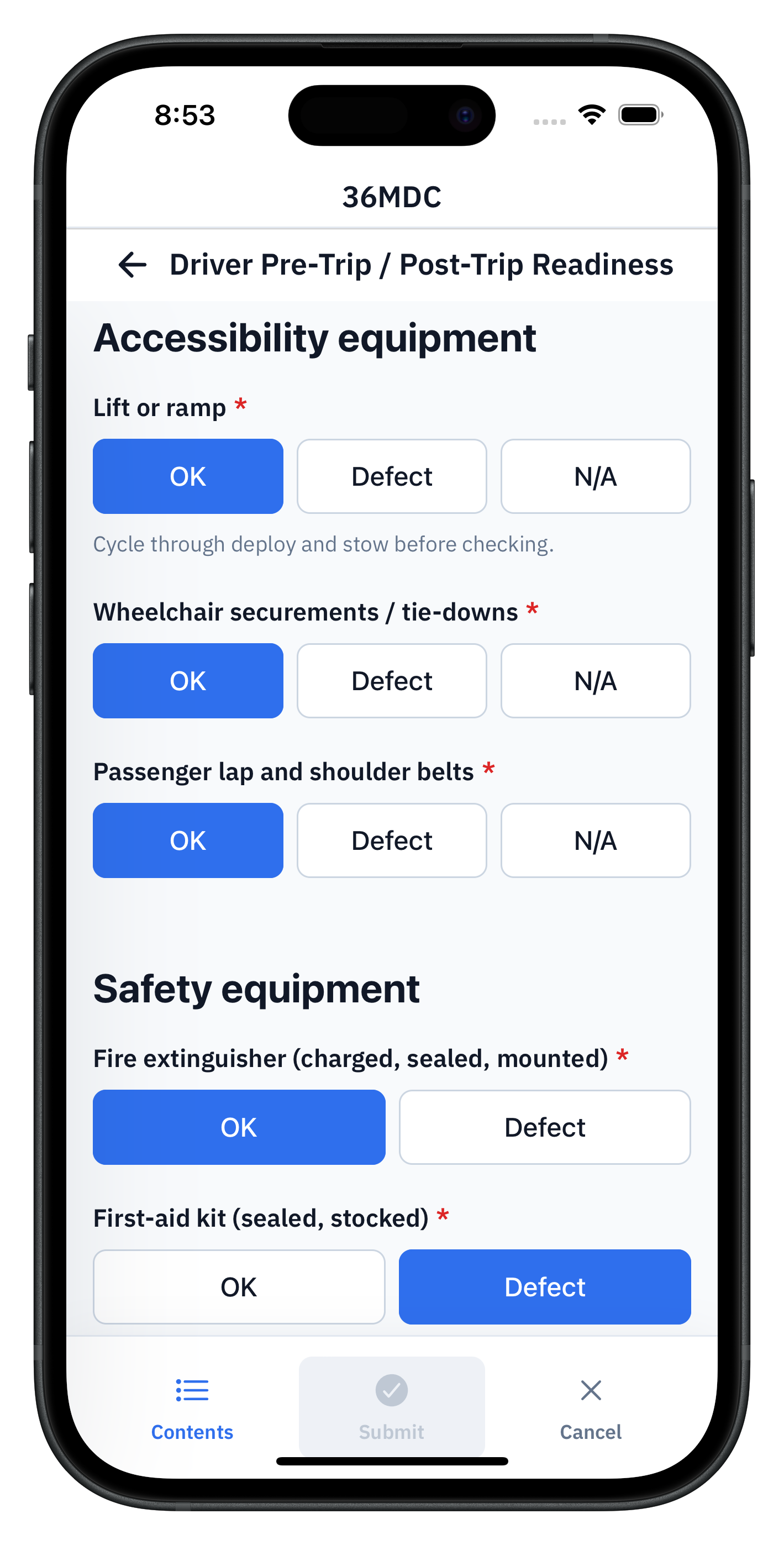
Accessible-vehicle equipment checklist
Sharpens differentiation for accessible fleets and NEMT-style operators where ADA readiness is daily work.
Lift or ramp operational check, securement system, tie-downs, lap and shoulder belts, optional spill kit, fire extinguisher, flashlight.
- 06
Roadside inspection corrective-action tracker
Strong expansion form once defect recording is live. Closes the 15-day correction clock cleanly.
Inspection report number, date, vehicle, violations cited, correction due date, certifying official, attached follow-up correspondence.
Where 36MDC fits
Not a full dispatch platform.
36MDC is the offline field-record layer for the forms, logs, inspections, incidents, and corrective actions that still happen on paper, clipboards, spreadsheets, email threads, or disconnected tools.
- Notbooking, dispatch, or fare collection
- Notvehicle telematics or live GPS tracking
- Notdriver scheduling and payroll
36MDC sits alongside the booking and dispatch software you already run. We are the layer for inspections, defects, and evidence — nothing more.
What your office gets
Field records become business data.
Once records sync, the office can search, export, audit, and report on them. The first workflow usually reveals the larger opportunity.
- 01
Find a record fast
Pull every DVIR for a vehicle since the last periodic. Find the last accessible-equipment check by ramp serial number.
- 02
Export cleanly
Export the maintenance history for one vehicle as a CSV. Hand a roadside inspector a binder-shaped PDF in seconds.
- 03
Track exceptions
See every defect that opened a DVIR, when it was repaired, and by whom. Nothing closes by accident.
- 04
Spot trends
Spot the recurring defect on a specific vehicle, route, or driver. Catch the pattern before it grounds the fleet.
- 05
Generate reports
Auto-build the safety meeting deck. Skip the photocopying.
- 06
Feed downstream
Push records to your maintenance management software, the insurance broker's spreadsheet, or the dashboard the GM wants on the wall.
Why fleets pick us.
Offline first
Drivers complete inspections on a phone or tablet whether the lot has signal or not. Records sync when the device reconnects. A weak signal behind a garage does not lose the report.
One loop, not three
The DVIR a driver writes is the same record the mechanic certifies and the dispatcher checks. No retyping, no lost paper, no separate shop log.
Audit-ready exports
Pull every DVIR or periodic inspection for a vehicle by date. The roadside inspector or insurance auditor sees a complete record, not a binder pile.
Walk through your fleet inspection loop
30-minute demo on a real device. We'll cover DVIRs, defect closure, periodic inspections, and accessible-equipment checks — and any specific inspection you flag in the booking notes.
We are accepting a small number of small passenger carriers as launch partners before public release. We are honest about what is ready and what is not.